

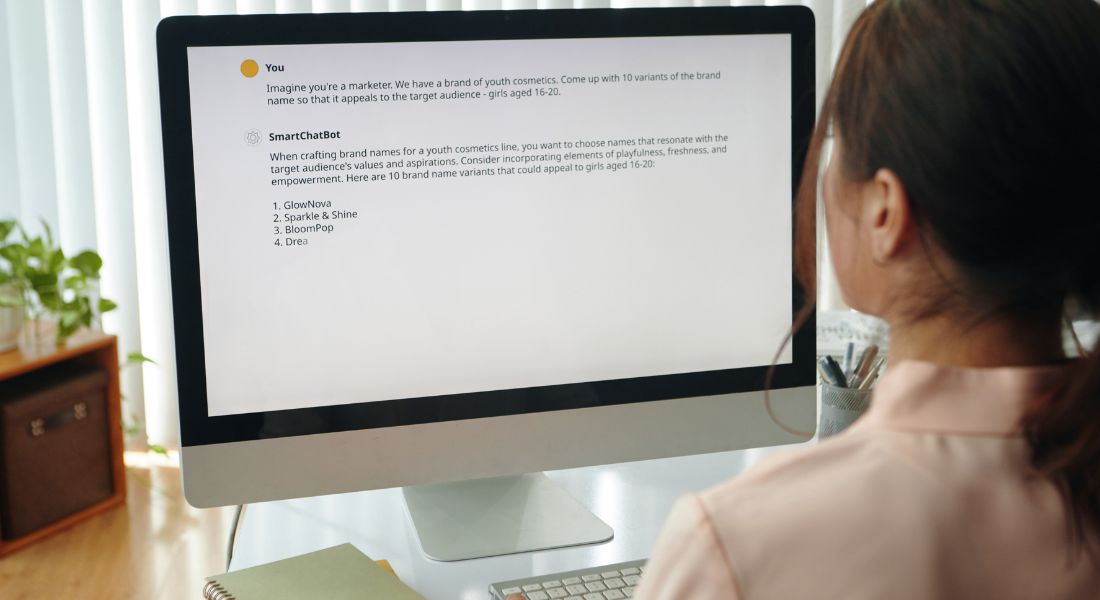
If you’ve ever sat down to write a video ad script and felt stuck, you’re not alone. I’ve been there too staring at a blinking cursor, trying to come up with something punchy, on-brand, and effective, all within 30 seconds of screen time. With so little space to make an impact, every word has to work hard. And let’s be honest: creating a high-performing ad script isn’t just about writing it’s about selling, storytelling, and stopping the scroll in a fraction of a second.
That’s where ChatGPT can be a game-changer.
Instead of brainstorming alone or recycling the same old templates, you can use AI to spark fresh ideas, uncover hidden messaging angles, and make sure every line earns its place in the script. ChatGPT doesn’t just help you write faster it helps you write smarter, with better alignment to your brand voice, audience needs, and campaign goals.
In this article, I’ll show you exactly how to use ChatGPT to level up your ad copy. We’ll walk through how it can help you tighten your messaging, explore different tones and formats, test multiple variations (great for A/B testing), and uncover creative ideas you may not have thought of on your own.
Whether you’re crafting skippable pre-rolls for YouTube, bite-sized Stories for Instagram, click-worthy Reels, or performance-driven TikTok ads, these tips will help you create sharper, faster, and more strategic video scripts without the overwhelm.
Let’s dive in.
Why Video Ad Scripts Matter More Than Ever

We live in a world of scrolls, skips, and short attention spans. Audiences today are constantly bombarded with content from news updates to memes to ads across multiple platforms. And in the midst of all that noise, your video ad has only a few seconds to prove it’s worth watching. In fact, research shows you often have just 3 seconds to capture someone’s attention before they decide to keep watching or swipe past.
That’s why the script isn’t just a “nice-to-have” it’s the core of your video’s performance. Even the most visually stunning content can fall flat if the message isn’t clear, relatable, or emotionally resonant.
A strong script helps you:
- Hook attention immediately
You can’t afford a slow build. The opening line has to stop the scroll, spark curiosity, or immediately strike a chord with your target audience. - Communicate value quickly
What’s in it for them? Your viewer should instantly understand the benefit, problem you’re solving, or unique value proposition you’re offering. - Stay aligned with your brand voice
Whether your tone is playful, serious, inspiring, or informative, your messaging needs to feel consistent with the rest of your content and brand identity. - Include a compelling call to action (CTA)
Whether you want viewers to click, sign up, visit your site, or make a purchase, your CTA must be direct, timely, and persuasive without feeling pushy.
In other words, your script carries a lot of responsibility. It’s the bridge between the creative concept and your marketing objective. It guides everything from the visuals and pacing to the emotional impact and conversion results.
And here’s the good news: you don’t have to build it all from scratch.
With tools like ChatGPT, refining your script has never been easier. You can brainstorm hooks, rewrite weak CTAs, tighten your messaging, or test different tones all in minutes. Whether you’re working solo or part of a creative team, it’s like having an always-available creative partner who’s ready to bounce ideas back and forth with you.
Step 1: Start with Your Raw Script Draft
Before you bring ChatGPT into the mix, you’ll need some raw material to work from. Think of it as your starting point something that gives the AI a direction to follow.
This could be:
- A bullet point list of your product’s key selling points
- An old or underperforming version of your ad script
- A rough outline or summary of what the video should say
The more context you provide, the better and more accurate the output will be.
Even if you’re not sure how to phrase things perfectly, that’s okay. ChatGPT works best when it has a clear prompt to respond to. I often start with something like:
“Here’s a 30-second video ad script for our product. Please rewrite it to be more energetic, speak directly to the audience, and include a strong CTA.”
Or, if you haven’t written anything yet:
“Write a 15-second ad script for our app that helps freelancers track their expenses. Keep it casual and benefit-driven.”
It helps to include details like the length of the video, the tone you’re going for, who the audience is, and what the goal of the ad is. ChatGPT responds especially well to prompts that clearly define these four things.
Once you’ve got your rough draft and your objective in mind, you’re ready to start shaping your script into something polished and compelling.
Step 2: Refine the Tone of Voice
Tone makes a huge difference in how your message is received. The same script can come across as formal, playful, punchy, emotional or completely flat depending on how it’s delivered. And in the fast-moving world of social media and paid video ads, tone can be the deciding factor between a viewer clicking through or scrolling past.
This is where ChatGPT becomes incredibly useful. You can feed it a script and ask it to adjust the tone to match your brand, platform, or target audience. Whether you’re aiming for a more professional feel or something quirky and offbeat, ChatGPT can quickly generate different tone variations to choose from.
Try giving clear, tone-specific prompts like:
- “Make this script sound witty and Gen Z-friendly.”
- “Adjust this for a more corporate, trustworthy tone.”
- “Rewrite this like a conversational TikTok voiceover.”
- “Give this a high-energy, motivational style.”
Here’s a simple before-and-after example:
Original:
“Our platform allows users to schedule appointments more efficiently.”
Refined with ChatGPT Prompt:
“Rewrite this in a fun, casual tone for a social media ad.”
Result:
“Ditch the back-and-forth! Book meetings in seconds with our app it’s your new secret weapon for getting things done.”
This kind of transformation can massively boost engagement especially on platforms like TikTok, Instagram Reels, and YouTube Shorts, where tone is everything. People don’t just want information; they want to feel like the brand gets them.
So if your script feels too stiff, generic, or just doesn’t “click,” refining the tone is often the easiest and fastest way to elevate it. And the best part? You can ask ChatGPT to give you multiple tone options and compare what works best for your campaign goals.
Step 3: Tighten Messaging with Word Count Limits
Video ad scripts are tight by nature. You’re working with 15, 30, maybe 60 seconds at most and within that tiny window, every single word has to work hard. There’s no room for fluff or long-winded explanations. But editing a script down to fit those constraints can be surprisingly tough especially when you’re attached to what you’ve already written.
That’s where ChatGPT comes in handy.
Let’s say you’ve written a 40-second script, but your ad slot is only 20 seconds. Instead of agonising over which sentences to cut, just hand it over to ChatGPT with a clear prompt, like:
“Here’s a 40-second script. Can you trim it to fit a 20-second video while keeping the main message intact?”
ChatGPT is surprisingly good at condensing ideas while preserving your tone and intent. It often removes filler phrases, restructures sentences, and keeps only what truly matters without making the script feel rushed or incomplete.
You can also be even more specific and set a word limit:
“Make this script under 60 words for a 15-second ad.”
This kind of instruction helps when you’re scripting for platforms like YouTube pre-roll ads, Instagram Stories, or TikTok, where every second (and syllable) counts.
The best part? You’ll usually get two or three usable variations right away. That means less time spent editing and more time fine-tuning performance, testing versions, or getting feedback from your team or client.
Step 4: Generate Multiple Hooks for A/B Testing
The first few seconds of your ad are make-or-break. That’s why I always test multiple hooks before settling on one.
Ask ChatGPT something like:
“Give me 5 variations of a strong opening line for this product ad. Focus on pain points or surprising stats.”
Example:
Original product: a water bottle that tracks your hydration.
Prompt:
“Write 5 hooks for a 15-second ad targeting busy professionals who forget to drink water.”
ChatGPT Output:
- “Dehydrated? You probably didn’t even notice until now.”
- “Your brain’s 75% water. Are you running low?”
- “Busy day? This bottle reminds you to hydrate.”
- “Think you’re drinking enough water? Think again.”
- “Meet the smart bottle that keeps you on track.”
From there, you can test which hook gets the most clicks or watch time in your campaigns.
Step 5: Localise or Personalise Script Variations
One script rarely fits all. What works for a TikTok audience in the US might not resonate with professionals on LinkedIn in the UK. And that’s okay your messaging should shift depending on who you’re speaking to and where.
Whether you’re targeting multiple markets, different age groups, or various platforms, ChatGPT can help you adapt your core message quickly and effectively. Instead of rewriting from scratch, you can prompt the AI to tweak your existing script to better fit each audience segment.
Here are a few prompt examples you can use:
- “Rewrite this script for a UK audience with British spelling and tone.”
- “Adjust this for 18–25 year-olds who love gaming.”
- “Rewrite this for LinkedIn keep it professional and informative.”
- “Make this version friendly for parents with young children.”
You can even ask ChatGPT to align your messaging with regional slang, tone down overly casual language, or tailor your call to action for a specific platform (e.g., “swipe up” for Instagram vs. “click the link” for Facebook).
This kind of localisation or personalisation is especially useful when:
- Running ads in different countries
- Targeting multiple demographics with the same product
- Testing creative variations across platforms like YouTube, TikTok, and Instagram
- Creating ads for niche communities with specific interests or pain points
It’s a fast and effective way to scale your messaging while keeping it relevant and without losing the nuance that makes your campaign feel personal and authentic.
Step 6: Rewrite for Different Platforms
Each platform has its own quirks, expectations, and ideal formats and your video ad script needs to match them to perform well.
On YouTube, you usually have more breathing room. Longer runtimes mean you can build a narrative, introduce your product in stages, and slowly warm up your viewer before delivering the CTA.
TikTok, on the other hand, thrives on fast cuts, unpolished visuals, and a casual, first-person delivery style. If your hook doesn’t land in the first two seconds, you’ve likely lost your viewer.
Facebook performs well with clear text overlays, emotional storytelling, and direct appeals that resonate with specific life situations or demographics.
Instagram Reels is all about eye-catching visuals, trending audio, and keeping things under 30 seconds. Your message needs to be visual-first and ideally tie into current cultural or social trends.
You can use ChatGPT to adapt your script for each platform with prompts like:
- “Rewrite this 30-second script into a TikTok-friendly version with a casual voiceover and punchy one-liners.”
- “Turn this YouTube ad script into a 15-second Instagram Reel that opens with a question and ends with a CTA.”
- “Make this script feel native to Facebook, with an emotional tone and bold text overlays.”
Instead of starting from scratch each time, let ChatGPT do the heavy lifting while you focus on visuals, delivery, and placement.
It’s a great way to stay native to each platform’s style and increase your chances of engagement across the board.
Step 7: Ask ChatGPT for CTA Variations

The call to action (CTA) is where a lot of ad scripts lose their spark. Generic lines like “Click now” or “Buy today” might technically work but they rarely inspire curiosity or trust.
That’s why I regularly use ChatGPT to refresh my CTAs and keep them aligned with the tone of the ad. A simple prompt like:
- “Give me 5 alternative CTA lines that sound less salesy but still encourage action”
…can completely change how engaging your closing line feels.
Here’s what ChatGPT might offer:
- “Ready to see it in action?”
- “Start your free trial now no strings attached.”
- “Your new favourite app is just a tap away.”
- “Join thousands who’ve already made the switch.”
- “Don’t take our word for it try it yourself.”
These kinds of CTAs feel conversational, low-pressure, and more in tune with modern advertising trends. They can boost click-through rates and conversions without needing to change the actual offer behind them.
So if your script feels solid but the ending falls flat, don’t rewrite the whole thing. Just ask ChatGPT for a few CTA tweaks and test the results.
Step 8: Use ChatGPT to Create Voiceover Scripts
If you’re working on a video with visuals already in place, but you need narration to bring everything together, ChatGPT can help craft the voiceover script too.
Whether it’s a product demo, explainer, or testimonial-style video, all you need to do is describe what’s happening on screen and ask something like:
- “Here’s what happens in each scene. Can you write a voiceover script to match?”
Or, if you already have the visuals mapped out:
- “Write a 30-second voiceover for a video showing our app being used in real-time by a freelancer.”
ChatGPT will return a narration that flows smoothly with the action, highlights key benefits, and helps keep viewers engaged from start to finish.
Even better you can take that script and feed it directly into AI voice tools like ElevenLabs or Murf.ai to create high-quality voiceovers in minutes. That means fewer delays and quicker turnaround for content creators working on tight schedules.
Bonus Tip: Train ChatGPT on Your Brand Voice
If you want ultra-consistent messaging, try this:
- Paste in a few previous ads or brand copy examples.
- Say:
“Use this as a style guide. Rewrite future scripts in this tone and voice.”
Now, every output ChatGPT gives you will be much more on-brand.
Real-World Example Workflow
Let me share a typical flow I use for my clients:
- Client gives me a rough draft or idea
- I use ChatGPT to generate 3–5 variations with different hooks and tones
- I narrow down the best-performing options and edit slightly
- Voiceover is created using AI or human talent
- Video is built and A/B tested across platforms
What used to take 5–6 hours now takes closer to 90 minutes.
Final Thought: Script Smarter, Not Harder
Crafting high-performing video ad scripts doesn’t have to be stressful or slow. With ChatGPT in your toolkit, you can brainstorm, refine, and test ideas faster than ever while keeping your tone, messaging, and CTAs sharp across every platform. Whether you’re building your next YouTube campaign, launching an Instagram Reel, or prepping a TikTok ad, this tool gives you a creative edge in a world that rewards fast, clever content.
If you’re looking to turn great scripts into great videos, you can contact our video production company in London to take your video content to the next level.
